Foundations
How FolksPMS is built, how you get in, how every page behaves, and the one idea that ties the whole suite together — the estimate-to-actuals spine.
Introduction & Architecture
Start hereFolksPMS is an enterprise Project Management Suite that runs a project from first estimate to final reconciliation on a single SQL-Server-backed engine. It is built on .NET 9 Blazor Server + ASP.NET Core Web API + SQL Server, and organised into 34 modules grouped under 8 navigation pillars.
Every read and write goes through a named stored procedure — generic CRUD SP_s plus rich DevSP_ workflow procedures. No ORM, no LINQ in business logic.
Estimation → Budgeting → Scheduling → Kick-Off → Actuals share one task shape, so any level overlays on another. The Deviation Engine watches the gap.
Users → roles → privileges → menus & page actions. A shared workflow listener routes approvals, escalations and deviations suite-wide.
Full English and Saudi-Arabic (RTL), switchable from the top bar. Blazor + SignalR keep dashboards and Gantts live.
1.1 The eight pillars
| Pillar | What it owns | Modules |
|---|---|---|
| Workspace | The daily cockpit — dashboard, registers, planning board. | DR, PR, PG, PL |
| Multi-Level Gantt | The six-level estimate-to-actuals continuum. | EG, BG, SG, KG, AG, DV |
| Delivery | Execution — turning the plan into delivered work. | TK, RS, TA, MM, QA, GT |
| Governance | Control gates and the audit trail. | CH, AC, ES, CO, AR |
| Service & Collab | Documents, calendar, notifications, training, tickets. | DM, CS, NT, TR, TT |
| Supply | Procurement and sub-contractors. | BF, SC |
| Reports & Insight | Cross-module reporting and analytics. | RM, IS |
| Administration | Identity, organisation, parameters, clients. | CM, OR, SP, UM UM locked |
1.2 The data flow at a glance
#mod-XX by its two-letter code). Part X is pure reference. The companion Exercise Workbook turns it all into muscle memory on one running case study.Login, Roles & RBAC
Every user has a Login, an Employee profile and one or more Roles. Roles are not labels — they drive exactly which menus, pages and actions you can reach.
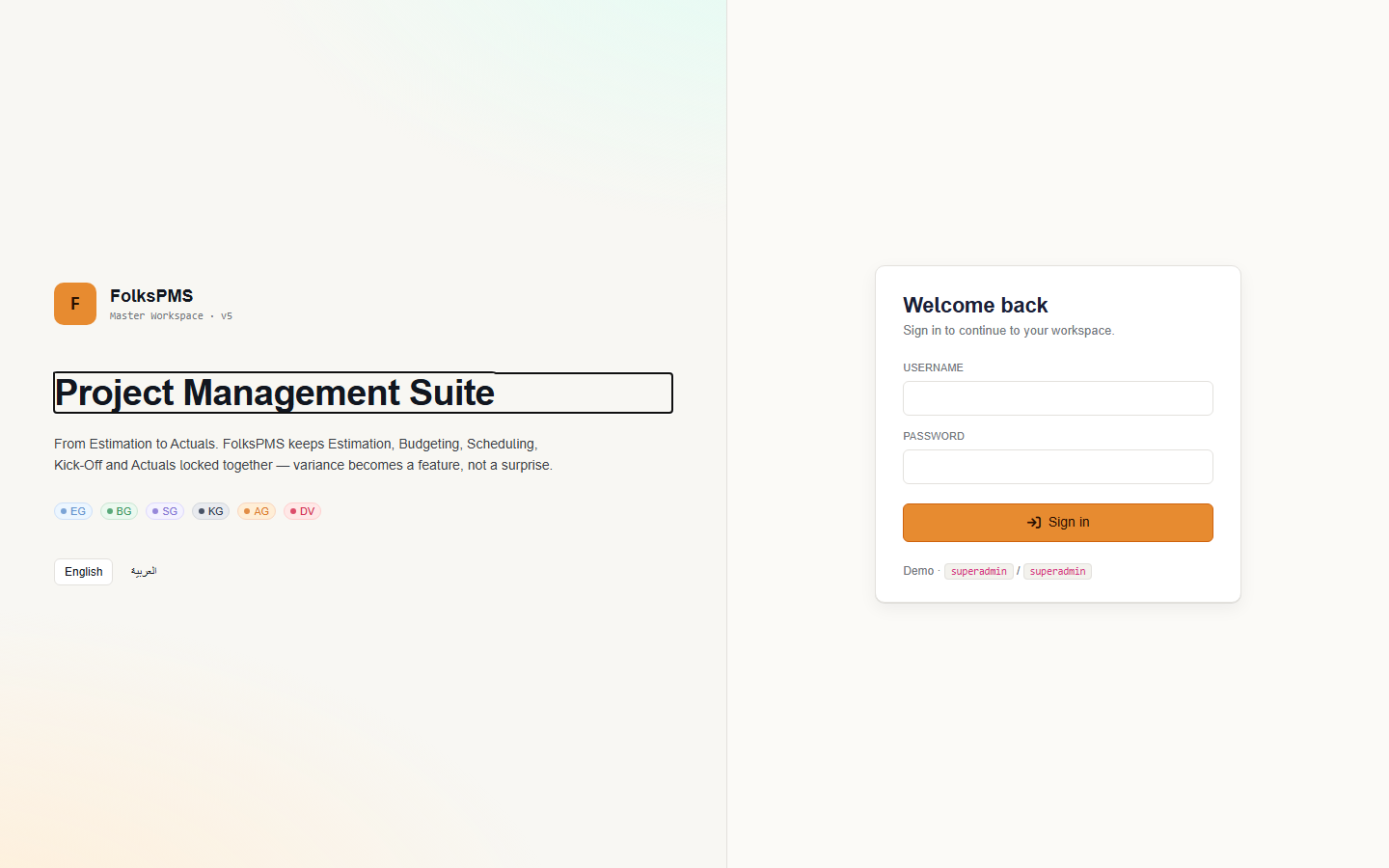
2.1 Signing in
- Open the FolksPMS front-end URL. Enter Username and Password.
- On success the API issues a JWT; the front-end resolves your role and redirects you to its default landing page — usually the Command Center.
- If your login status is
InactiveorBlocked, sign-in is refused and only an administrator can restore it.
superadmin / superadmin sees everything; riyam / riyam@123 is a scoped delivery account. Change these before any real deployment.2.2 Roles you'll meet
| Role | Sees | Cannot |
|---|---|---|
| SuperAdmin | Every module, menu and action. | (nothing — full access) |
| Project Manager | Full delivery on own projects — Gantts, tasks, resources, charter. | Edit other PMs' projects; UM master setup. |
| Programme Manager | Portfolio view across projects; programme links. | Day-to-day task edits outside scope. |
| Approver | Approval queues across modules. | Create transactional records. |
| Viewer | Read-only dashboards and reports. | Any create / edit / delete. |
2.3 The RBAC chain
UserRolePrivileges per SubMenu × action. See User Management.Common Page Operations
FolksPMS pages come in a handful of consistent shapes. Learn the pattern once and every one of the 369 pages feels familiar.
3.1 The four page archetypes
A filterable grid with a toolbar — Add / Refresh / Export / Search — and a per-row action column (View / Edit / Delete).
A form (modal or wizard) for create / edit. Codes are auto-generated; user & date stamps come from the JWT, not the form.
A read view that pulls a composite record via a DevSP_ — header plus related tabs (team, phases, charter, comments).
Interactive Gantt or parameterised report. Read-mostly, built for overlay and export.
3.2 Anatomy of a list page
| # | Code | Name | Status | Actions |
|---|---|---|---|---|
| 1 | PRJ-2026-0007 | Riverside Office Fit-Out | On Track | |
| 2 | PRJ-2026-0008 | Harbour Data Centre | At Risk |
3.3 Conventions that hold everywhere
- Codes auto-generate. Leave the code field blank when adding — the SP fills a human-readable identifier (e.g.
PRJ-2026-0007). - Soft delete. Most rows carry
IsActive— prefer deactivation over physical delete so history survives. - Stamping. CreatedBy / CreatedDate / UpdatedBy / UpdatedDate are filled from your token — the Audit trail depends on it.
- Every dropdown is a picklist. Status, Priority and Severity all read from the central
SP_Pickliststable — see System Parameters. - Files go through Documents. Binaries never sit in an entity table — they're uploaded via the hook and referenced from Documents.
The Estimate-to-Actuals Spine
Core conceptThis is the single idea that organises FolksPMS. The same project task is expressed at six levels of fidelity, each refining the last. Because all six share one underlying shape, the multi-level Gantt can overlay any level on any other — and the gap between the frozen plan and reality becomes a measurable, governable signal.
Estimation
Rough-order sizing to win the mandate.
Budgeting
The estimate, costed into money.
Scheduling
Dates, dependencies, critical path.
Kick-Off
The frozen, immutable baseline.
Actuals
What really happened.
Deviation
Breaches become Change Requests.
4.1 How a level feeds the next
4.2 Overlaying levels
The multi-level Gantt lets you toggle any level on or off and compare them in one chart. The most important comparison is Kick-Off vs Actuals — the baseline bar and the actual bar drawn together, so slippage is visible at a glance.
Green = frozen Kick-Off baseline · Amber = Actuals · Red diamond = milestone. The amber bars running past the green ones are exactly what the Deviation Engine measures.
4.3 The deviation loop
Navigation — the 8 Pillars
The left navigation groups all 34 modules into eight pillars. Each module routes as /w/{Mc}/{Sub} and is documented in this manual as #mod-XX by its two-letter code. Click any chip to jump.
Workspace
Multi-Level Gantt
Workspace
Your daily cockpit — the Command Center dashboard, the project and programme registers, and the planning board where work is shaped before it is scheduled.
Command Center
WorkspaceCommand Center & operational dashboards.
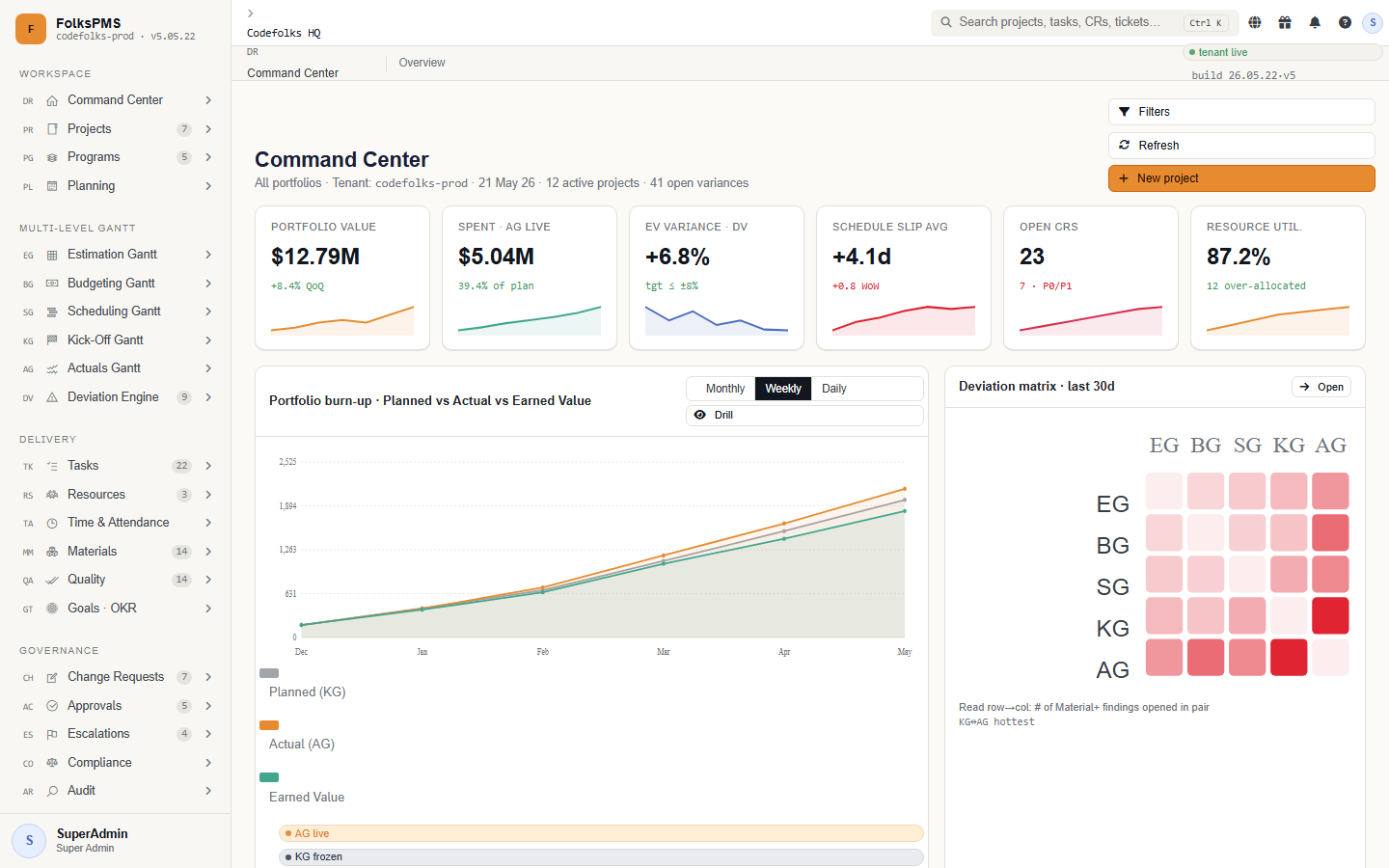
The Command Center is the post-login landing page and the executive heartbeat of FolksPMS. It rolls up live counts from every pillar — active projects, open tasks, pending approvals, deviation alerts and budget burn — into a single glanceable cockpit.
Dashboards here are read-mostly: they aggregate other modules through DevSP_* rollup procedures rather than owning transactional data of their own.
How it works
Concepts that matter
Every dashboard tile maps to one of the eight navigation pillars and links straight to it.
Counts come from cross-module DevSP_ aggregations, refreshed on load and honouring your role.
DevSP_s, so its numbers are always a live reflection of the modules underneath.Projects
WorkspaceThe project register — the spine of the suite.
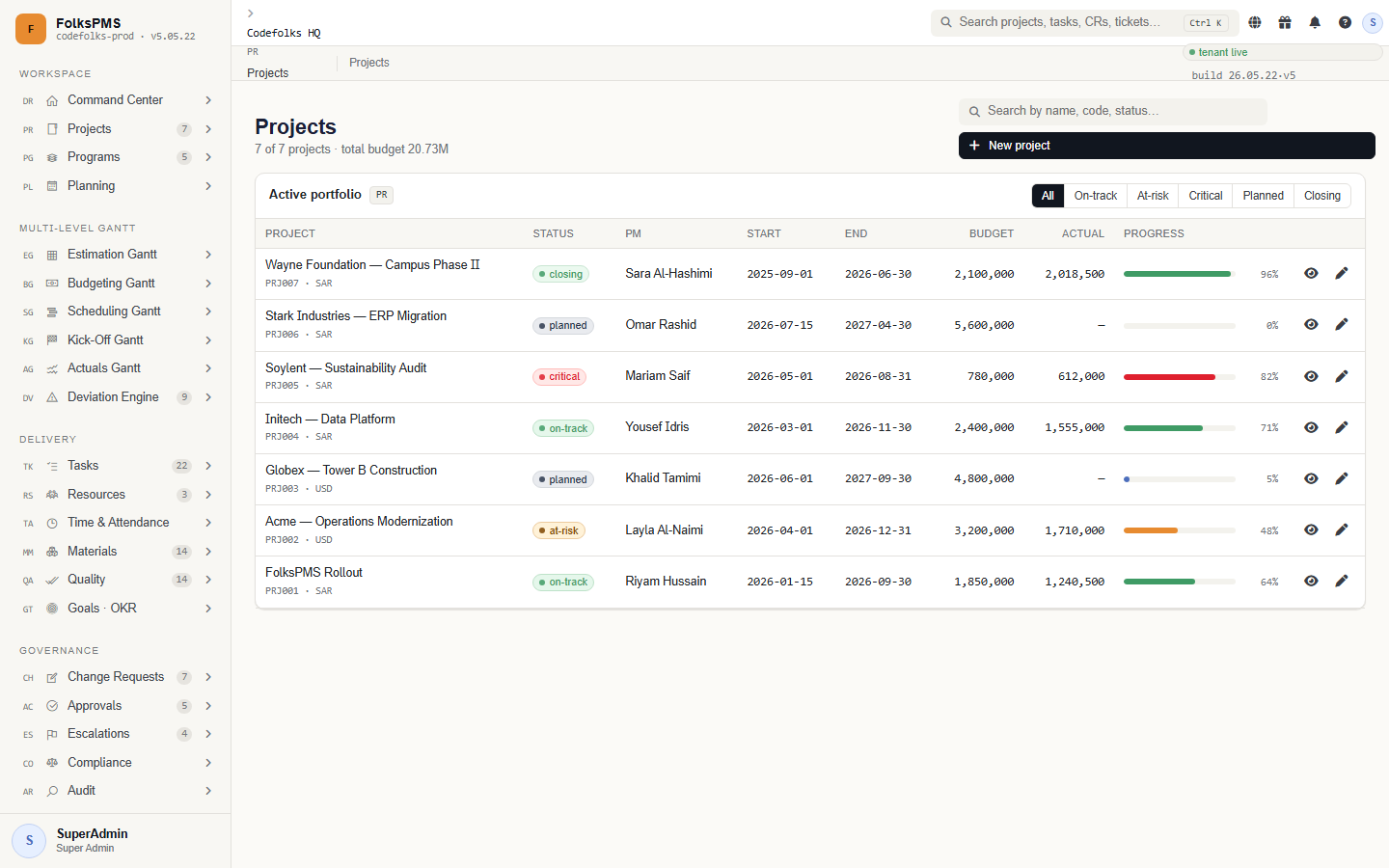
Projects is the master entity that almost every other module references. A project carries its code, client, currency, planned dates, budget envelope and live status, and fans out to child records: phases, the delivery team, and the project charter.
Because the project ID threads through tasks, budgets, schedules, change requests and tickets, getting the project record right is the single most important data-entry act in FolksPMS.
The project lifecycle
Concepts that matter
Auto-suggested, human-readable identifier carried on every downstream record.
The list view derives on-track / at-risk / critical from status + progress.
BudgetTotal sets the ceiling the Budgeting Gantt and Actuals reconcile against.
Structure long projects with phases — every Gantt groups by them.
Roles
| Role | Can do |
|---|---|
| Project Manager | Full create/edit on own projects, team and charter. |
| Programme Manager | Read across the portfolio; links projects to programmes. |
| Executive | Read-only via Command Center. |
Tables you'll touch
| Table | Purpose |
|---|---|
PR_Projects | The master project header — code, client, currency, dates, budget, status. |
PR_ProjectPhases | Stages a project is broken into; tasks and schedules group by phase. |
PR_ProjectTeam | People assigned to the project with their role and allocation. |
PR_ProjectCharter | The signed-off scope, objectives and success criteria. |
Entry
- Code auto-fills — leave blank
- Currency is fixed at creation
- Status drives the health colour
Detail / profile
- Composite read via a
DevSP_ - Tabs: phases · team · charter
- Roll-ups of CRs & deviations
Status from the picklist (the health colour depends on it), confirm the currency before you save, and use phases — the Gantts group by them.Programs
WorkspaceProgrammes — portfolios of related projects.
A Programme groups several projects that share an outcome, sponsor or funding line. Programmes let executives steer a portfolio: aggregate budget, combined milestones and shared benefits roll up here.
Projects link up to a programme; the programme never owns the project's transactional detail, only the relationship and portfolio-level fields.
How it works
Concepts that matter
Budget and progress aggregate from member projects.
The "why" — outcomes the programme must deliver.
PG_* tables hold the programme header and its project links. CRUD runs through generic SP_s; portfolio rollups read member projects through a DevSP_.Planning
WorkspacePlanning board — shaping work before it is scheduled.
Planning is where work is shaped: planning items, backlog entries and capacity assumptions are captured before they harden into a scheduled Gantt. Think of it as the bridge between "we should do this" and "this is on the plan".
Planning records are deliberately lightweight — they carry intent and rough sizing, and graduate into tasks or schedule lines once committed.
How it works
Concepts that matter
Unscheduled but agreed work, ranked by priority.
Rough team capacity used to sanity-check the plan.
The Multi-Level Gantt
The six-level planning continuum and its closing act. The same task, expressed at six levels of fidelity — Estimation, Budgeting, Scheduling, Kick-Off, Actuals — with the Deviation Engine turning the gap into governed change.
Estimation Gantt
Level 1Level 1 — the first cut of the plan.
The Estimation Gantt is the first cut: rough-order-of-magnitude tasks and durations used to size the work and win the mandate. Estimates here feed the budget.
All six levels share the same task shape so they can be overlaid on one chart — the multi-level Gantt toggles let you compare any level against another (e.g. Kick-Off vs Actuals).
How it works
Rough order of magnitude — accuracy comes later.
Estimation totals seed the Budgeting Gantt.
Budgeting Gantt
Level 2Level 2 — the estimate, costed into money.
The Budgeting Gantt converts the estimate into money: a budget header with cost lines mapped to tasks and phases. This is the financial baseline the Actuals later reconcile against.
How it works
Each line ties spend to a task/phase and a category.
Frozen budget the Deviation Engine compares against.
Scheduling Gantt
Level 3Level 3 — work on a real calendar.
The Scheduling Gantt turns sized, budgeted work into a real calendar: tasks with start/end dates, dependencies and the critical path. This is the working schedule the team executes against.
How it works
Finish-to-start links drive the critical path.
Unlike EG/BG, SG tasks carry true calendar dates.
StartDate/EndDate, so this is the first level that renders a true calendar.Kick-Off Gantt
Level 4 · BaselineLevel 4 — the frozen baseline.
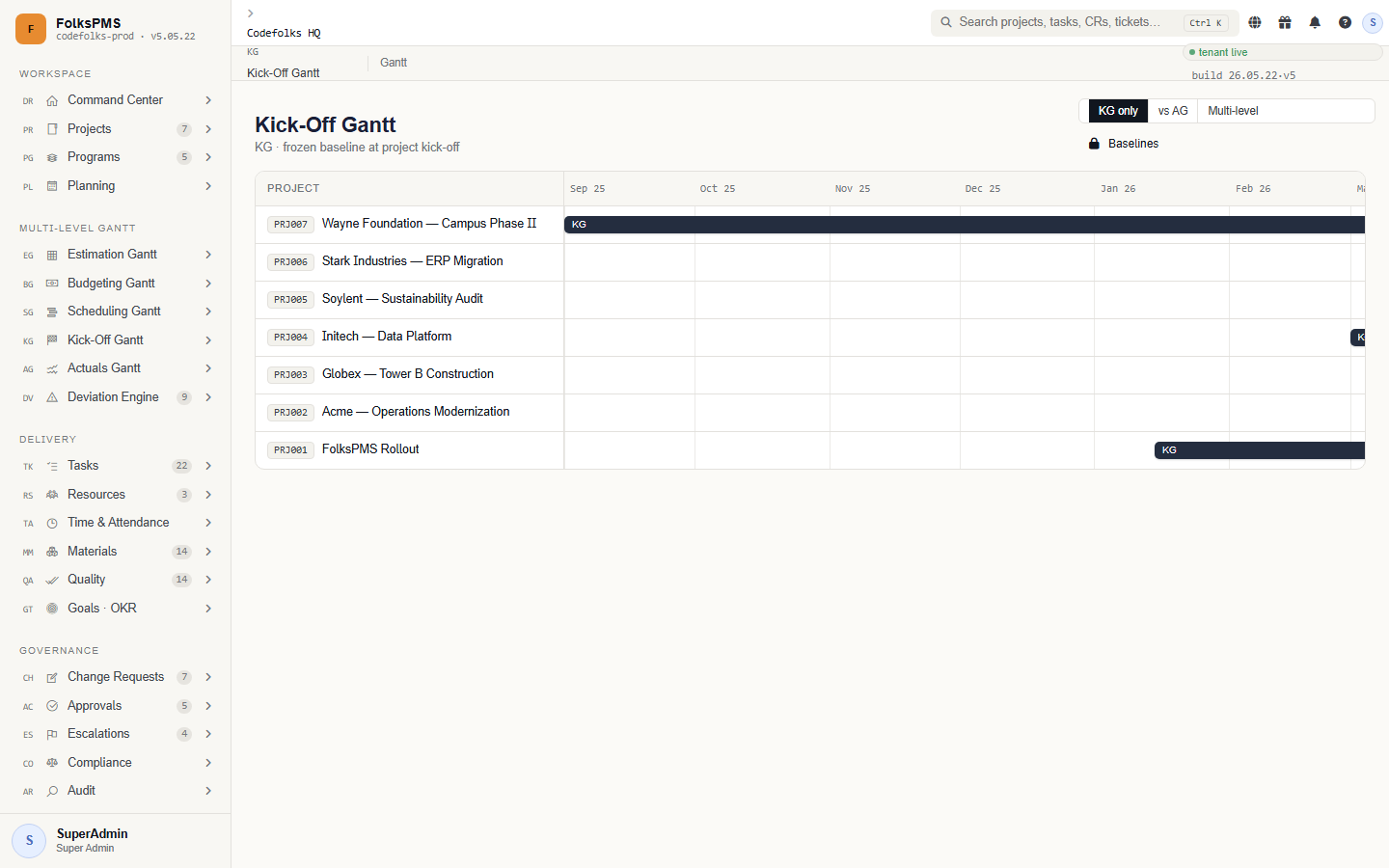
At project kick-off the schedule is frozen into a baseline. The Kick-Off Gantt is immutable: it is the agreed plan against which every later actual and deviation is judged. Re-baselining is a governed event, not an edit.
How it works
Baseline tasks are read-only once frozen.
KG is a point-in-time copy of the schedule.
Actuals Gantt
Level 5Level 5 — what really happened.
The Actuals Gantt records what really happened: actual start/finish, actual progress and actual cost as work is delivered. Overlaying it on the Kick-Off baseline reveals slippage at a glance.
How it works
The overlay against KG is the core insight.
Reconciles against the frozen budget baseline.
Deviation Engine
Level 6 · SignatureLevel 6 — where execution meets governance.
The Deviation Engine is the signature of FolksPMS. It continuously compares Actuals (AG) against the frozen Kick-Off baseline (KG) and, when variance breaches a threshold, auto-promotes the deviation into a Change Request — closing the loop between execution and governance with no manual hand-off.
The detection-to-governance loop
Concepts that matter
Tolerances that decide when a gap becomes a deviation.
Breaching deviations become Change Requests automatically.
Severity thresholds (example)
| Band | Schedule variance | Cost variance | Action |
|---|---|---|---|
| Minor | < 5% | < 3% | Logged, watched — no CR. |
| Material | 5–15% | 3–10% | Deviation raised → CR auto-created. |
| Critical | > 15% | > 10% | Deviation + CR + escalation. |
Delivery
Execution modules — tasks, resources, time & attendance, materials, quality and goals — where the plan turns into delivered work.
Tasks
DeliveryTasks — the unit of delivery.
Tasks are the atomic units of work. Each task belongs to a project (and usually a phase), carries a status and priority, and accumulates comments, attachments and dependencies as it is worked.
Where the Gantts plan time, Tasks track the day-to-day reality of who is doing what, and surface blockers early through status and dependencies.
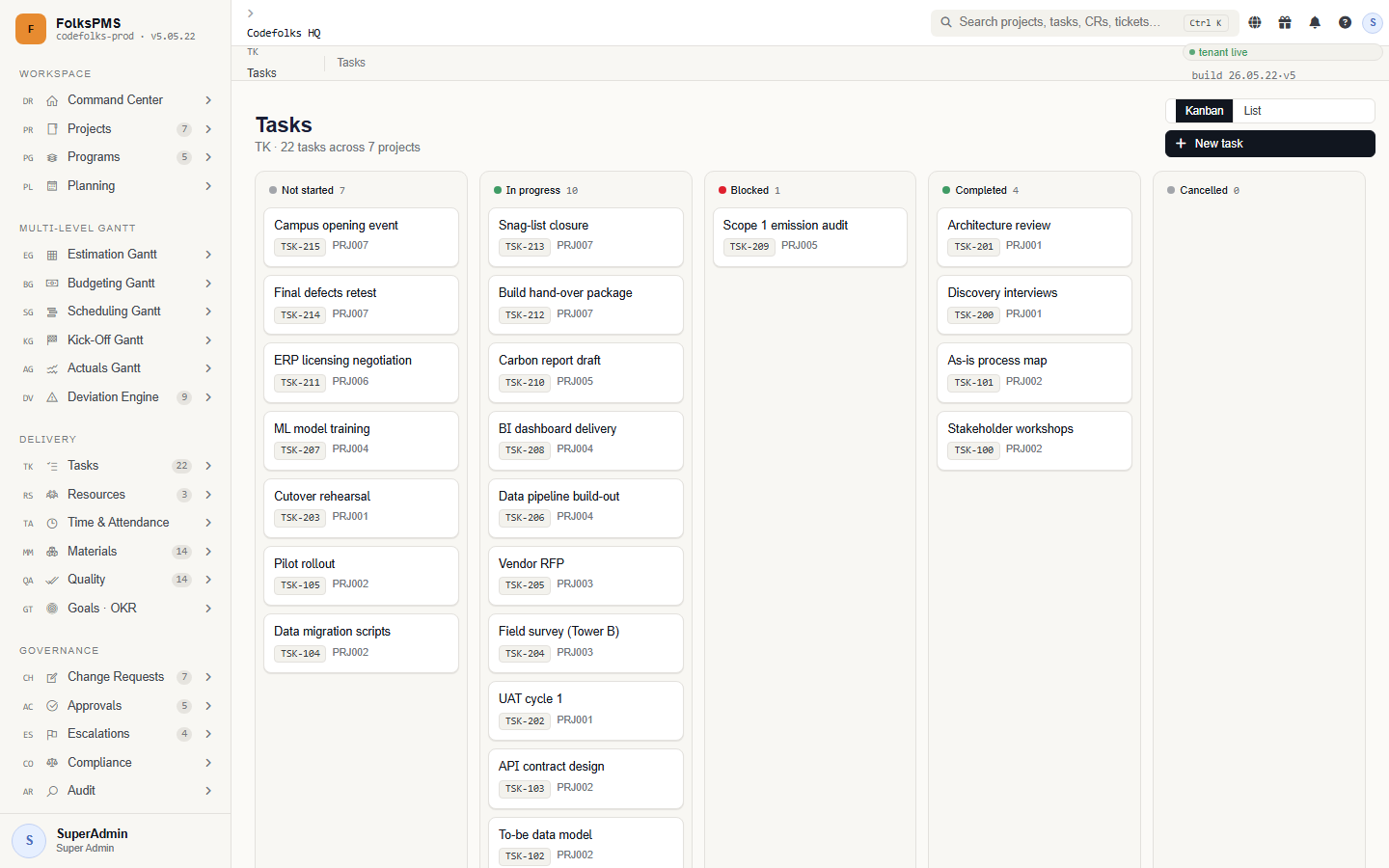
The task lifecycle
Concepts that matter
From the central Priority picklist; drives sorting.
One task blocking another, tracked explicitly.
Files live via the upload hook, not in the table.
Tables you'll touch
| Table | Purpose |
|---|---|
TK_Tasks | The task header — project, phase, owner, status, priority, dates. |
TK_TaskComments | Threaded discussion on a task. |
TK_TaskAttachments | File attachments linked to a task. |
TK_TaskDependencies | Predecessor / successor links between tasks. |
Resources
DeliveryResources — people, roles and allocation.
Resources manages the people (and sometimes equipment) available to projects: their roles, rates and how their capacity is allocated across the schedule.
Resource allocation is what makes the schedule honest — a Gantt that ignores who is available is fiction.
How it works
Share of a resource's capacity given to a project.
Cost rate feeding actual labour cost.
Time & Attendance
DeliveryTime & Attendance — timesheets and presence.
Time & Attendance captures effort against tasks (timesheets) and presence (attendance). Logged time feeds actual labour cost and progress; attendance underpins capacity and compliance.
Approved timesheets are the source of truth for actual effort that the Actuals Gantt and budget reconciliation rely on.
How it works
Hours booked against tasks for a period.
Presence record feeding capacity.
Materials
DeliveryMaterials — items, requisitions and goods receipt.
Materials tracks the physical items a project consumes: the catalogue, stock, requisitions raised against projects, and goods-received notes (GRN) when supply arrives.
Materials shares the Requisition and GRN concepts with the Buy/Sell module — here the focus is internal consumption, there it is external purchasing.
How it works
A request for material against a project.
Goods-received note confirming delivery.
Quality
DeliveryQuality — checklists, inspections and defects.
Quality Assurance records inspections, quality checklists and defects. Defects carry a severity and a status lifecycle from raised to closed, giving a measurable picture of delivery quality.
Quality data feeds governance: a spike in high-severity defects is exactly the kind of signal Escalations and the Command Center should surface.
How it works
From the central Severity picklist.
Open → Fixed → Verified → Closed.
Goals · OKR
DeliveryGoals · OKR — objectives and key results.
Goals / OKR aligns delivery to outcomes. Objectives carry measurable key results; progress on key results shows whether the work is moving the needle, not just keeping busy.
OKRs connect the strategic "why" (often a programme benefit) to the tactical "what" (tasks and milestones).
How it works
A qualitative outcome to achieve.
A quantitative measure of the objective.
Governance
Control gates: change requests, approvals, escalations, compliance and audit. Nothing material moves without a recorded decision.
Change Requests
GovernanceChange Requests — the controlled path to change.
Change Requests is the governed funnel for any change to scope, schedule or budget. CRs may be raised by hand or created automatically by the Deviation Engine when a baseline breach is detected.
A CR moves through a status lifecycle (Draft → Submitted → Approved/Rejected → Implemented) with an approval gate, so every material change has an owner, a rationale and a decision on record.
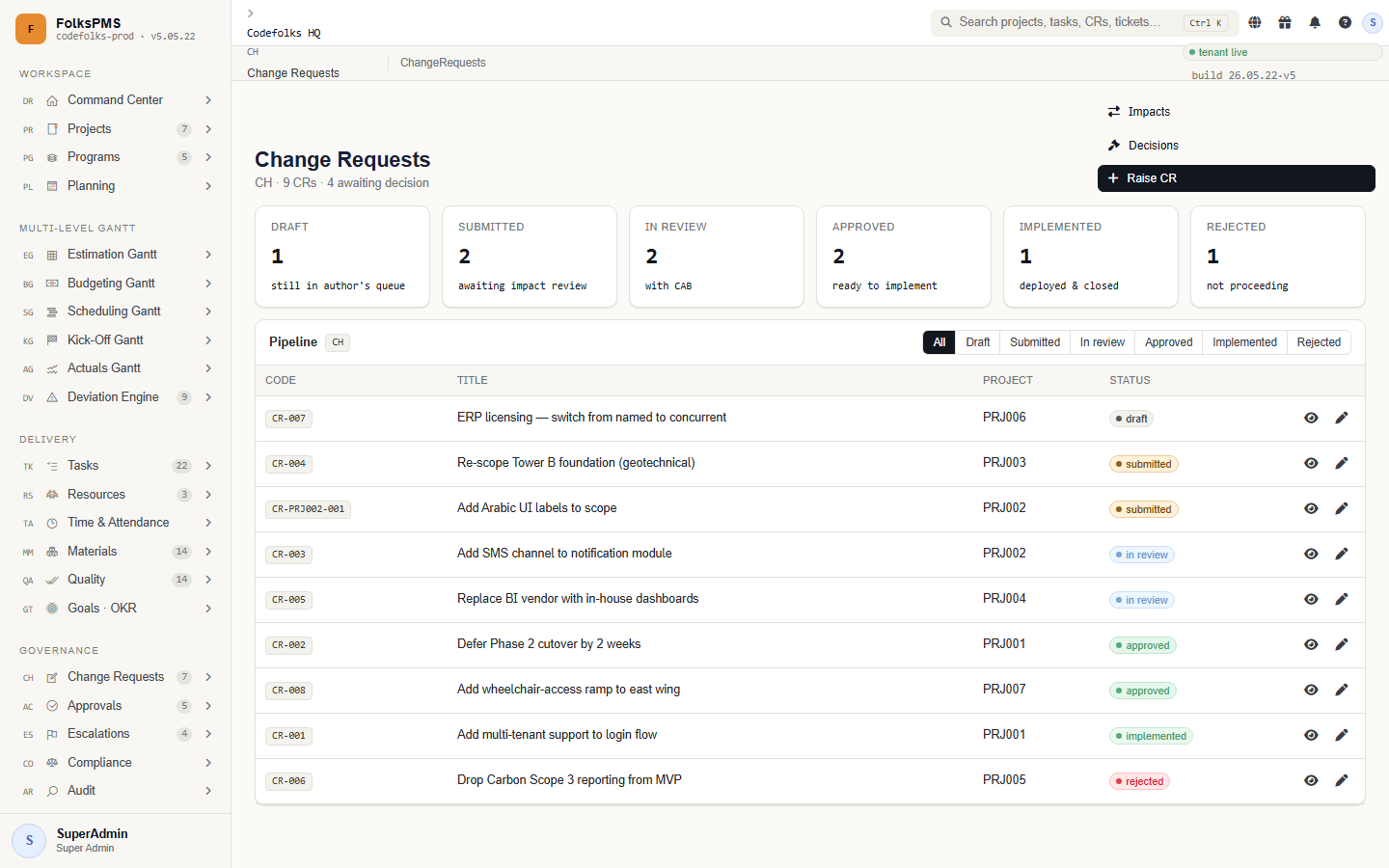
The CR lifecycle
Deviation breaches become CRs automatically.
Draft → Submitted → Approved → Implemented.
Every CR is a permanent governance record.
Approvals
GovernanceApprovals — workflows, steps and delegations.
Approvals provides the reusable approval machinery the rest of the suite plugs into: a workflow definition, its ordered steps, delegations for when an approver is away, and the approval records themselves.
When a CR, timesheet, requisition or leave needs sign-off, it routes through an Approvals workflow and lands in the approver's queue.
How it works
Sequential stages an item must clear.
Temporary reassignment of approval authority.
Tables you'll touch
| Table | Purpose |
|---|---|
AC_Workflows | An approval workflow definition. |
AC_Steps | Ordered steps within a workflow. |
AC_Delegations | Temporary reassignment of an approver's authority. |
AC_Approvals | Individual approval records and their decisions. |
Escalations
GovernanceEscalations — surfacing what is stuck.
Escalations raises the alarm when something breaches an SLA or sits unresolved: a blocked task, an overdue approval, a high-severity defect. Escalations carry their own status lifecycle and route to the right level.
Escalations are the immune system of the suite — they make sure problems get attention before they become incidents.
How it works
The most common escalation trigger.
Who it rises to.
Compliance
GovernanceCompliance — obligations and evidence.
Compliance tracks the regulatory, contractual and policy obligations a project must satisfy, and the evidence that proves it. Each obligation has a status and an owner.
Compliance turns "we should be compliant" into an auditable register of who owns what and whether it is met.
How it works
A requirement the project must meet.
Documents proving an obligation is met.
Audit
Read-onlyAudit — the immutable record of who did what.
Audit reports expose the trail: who changed which record, when, and from what to what. Audit is read-only by design — it observes the rest of the suite rather than owning data.
Combined with the platform's CreatedBy / UpdatedBy stamping, Audit answers the question every governance review asks: prove it.
How it works
Every change is tied to a user and timestamp.
Audit observes; it never edits.
Service & Collaboration
Documents, calendar sync, notifications, training and a ticket/helpdesk desk — the connective tissue that keeps the team aligned.
Documents
ServiceDocuments — the versioned project library.
Documents is the project's filing cabinet: documents, versions and folders. Binary files are stored via the upload hook; the table holds metadata, version and the link.
Charters, evidence, drawings and contracts all live here so other modules can reference a single source of truth.
How it works
Each upload is a new version, history retained.
Binaries live via the upload hook.
Calendar Sync
ServiceCalendar Sync — events and external calendars.
Calendar Sync publishes project milestones, meetings and deadlines as calendar events and keeps them in step with external calendars.
It is the lightweight glue that puts project dates where the team already looks — their own calendar.
How it works
A dated item published to calendars.
Two-way alignment with external calendars.
Notifications
ServiceNotifications — the message queue.
Notifications is the suite's outbound message queue: templates define the message, the queue holds pending sends, and a status tracks delivery.
Approvals, escalations and deviations all drop notifications here rather than mailing directly, so delivery is observable and retryable.
How it works
Parameterised message body.
Pending / Sent / Failed.
Training
ServiceTraining — courses, sessions and records.
Training manages the courses people need, the sessions that deliver them, and the records of who completed what. It underpins competency and compliance.
Training records prove a resource is qualified for the role they are allocated to — a quiet but important governance link.
How it works
A unit of learning.
Evidence a person is trained.
Tickets · Helpdesk
ServiceTickets · Helpdesk — issues and support requests.
Tickets / Helpdesk is the intake desk for issues and support requests that aren't planned tasks: a stakeholder query, a defect report from the field, an access request. Tickets carry priority and a status lifecycle.
Tickets that turn out to be real work can be promoted into tasks or change requests, keeping the planned plan clean.
How it works
From the central Priority picklist.
Open → In Progress → Resolved → Closed.
Supply
Buy / sell procurement and sub-contractor management — bringing external goods, services and partners into the project safely.
Buy / Sell
SupplyBuy / Sell — procurement and purchasing.
Buy / Sell handles external procurement: purchase requisitions, purchase orders to vendors, and goods receipt (GRN) when they deliver. It is the money-out counterpart to delivery.
BF shares the Requisition and GRN vocabulary with Materials; here the counterpart is an external vendor and a PO, not internal stock.
How it works
External supplier on a PO.
Requisition ↔ PO ↔ GRN before payment.
Sub-Contractors
SupplySub-Contractors — external delivery partners.
Sub-Contractors manages the partners who deliver parts of the work: their contracts, scope packages, and performance. It brings external delivery under the same governance as internal work.
Sub-contractor packages link to the schedule and budget so external work is planned and costed alongside your own.
How it works
Terms governing the partner.
Scope assigned to the sub.
Reports & Insight
Cross-module reporting and the Insights analytics surface that turns the warehouse of project data into decisions.
Reports
ReportingReports — cross-module reporting.
Reports is the standard reporting surface: parameterised, filterable reports that draw across modules through DevSP_* procedures. Where module Report pages give a module view, RM gives the cross-cutting view.
Reports are read-only and built for export — the format finance and the steering committee expect.
How it works
Filters that scope the report.
Built to leave the system.
Insights
AnalyticsInsights — analytics and trends.
Insights turns the warehouse of project data into trends and predictions: burn rates, deviation patterns, resource utilisation, quality trajectories. It is the analytical layer above plain Reports.
Insights answers "what is likely to happen" where Reports answers "what happened".
How it works
Direction over time, not a point.
Forward-looking signals.
Administration
Platform foundations — user management & RBAC, organisation structure, system parameters and the client master.
Client Master
AdminClient Master — the customer register.
Client Master holds the customers projects are delivered for: client records, contacts and contracts. Every project references a client, so this register is a prerequisite for project creation.
Clean client data here flows into every invoice, report and contract reference downstream.
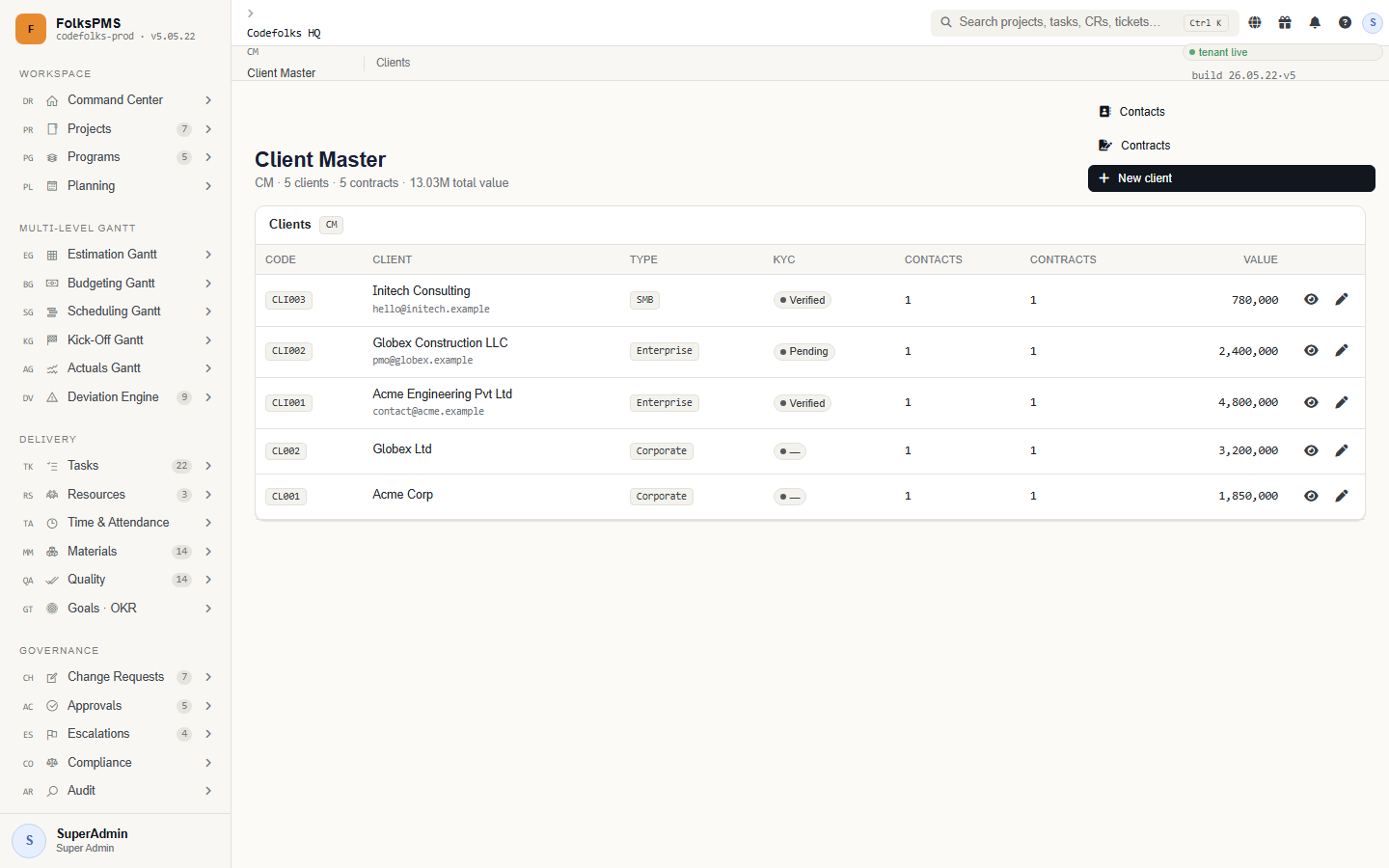
How it works
Tables you'll touch
| Table | Purpose |
|---|---|
CM_Clients | The client master record — name, code, key commercial fields. |
CM_ClientContacts | People at the client and how to reach them. |
CM_ClientContracts | Contracts / commercial agreements with the client. |
Organisation
AdminOrganisation — internal structure.
Organisation models your own company: business units, departments, locations and the org hierarchy. It is the internal mirror of Client Master.
Org structure scopes reporting and resource pools — knowing which unit owns a project drives a lot of rollups.
How it works
Parent/child org structure.
Physical sites.
System Parameters
Admin · BackboneSystem Parameters — the configuration backbone.
System Parameters holds the suite's configuration: global settings, the central SP_Picklists lookup that powers every Status/Priority/Severity dropdown, currencies and number sequences.
Almost every dropdown you see elsewhere is fed from here. Changing a picklist value here changes it everywhere — with the matching CHECK constraint kept in step.
How it works
Tables you'll touch
| Table | Purpose |
|---|---|
SP_Picklists | The central lookup behind every coded dropdown in the suite. |
SP_Parameters | Global key/value system settings. |
SP_Currencies | Currency master used by projects and budgets. |
SP_NumberSequences | Auto-numbering sequences for codes. |
SP_Picklists and update the column's CHECK constraint. Treat parameters as production config — they ripple everywhere.User Management
Locked · SharedUser Management — identity, RBAC and workflow.
User Management is the shared, locked platform foundation: users and logins, employees, departments, designations, roles and the menu/privilege matrix that drives what each role can see and do — plus the workflow listener.
UM is inherited verbatim from the Folks platform and shared across products. It is documented here as reference; changes to UM affect every consuming application, so treat it as read-only in a PMS context.
How it works
User → role → privileges → menus/actions.
Shared platform — do not modify in PMS.
Drives approval routing suite-wide.
Roles
| Role | Sees |
|---|---|
| SuperAdmin | Everything — the seed admin account. |
| Project Manager | Delivery modules for own projects. |
| Approver | Approval queues across modules. |
| Viewer | Read-only dashboards and reports. |
/UserManagement), not the /w/{Mc}/ pattern.Reference
The look-up half of the manual — status vocabularies, the SQL-first data model, bilingual behaviour, troubleshooting and a glossary.
Status & Picklist Reference
Every coded dropdown in FolksPMS is fed from SP_Picklists (see System Parameters). These are the values you'll meet most, and the colour each maps to on a list page.
Project & task status
| Status | Meaning | Health colour |
|---|---|---|
| Planned | Created, not yet started. | Blue / neutral |
| On Track | In progress, within tolerance. | Green |
| At Risk | Progress slipping, watch it. | Amber |
| Critical | Breaching threshold — deviation likely. | Red |
| Closed | Completed or cancelled. | Grey |
Priority & severity
| Scale | Values (high → low) | Used by |
|---|---|---|
| Priority | Critical · High · Medium · Low | Tasks, Tickets, Planning backlog |
| Severity | Critical · High · Medium · Low | Quality defects, Escalations |
| Deviation band | Critical · Material · Minor | Deviation Engine → Change Requests |
Change Request lifecycle
SP_Picklists but its column CHECK constraint hasn't been updated — the two must stay in step.Data Model & SQL-First Architecture
FolksPMS is deliberately SQL-first: business logic lives in stored procedures, not in an ORM. Understanding the naming convention lets you predict where any piece of data lives.
Naming conventions
| Pattern | Meaning | Example |
|---|---|---|
<PREFIX>_* | A table belonging to a module. | PR_Projects, TK_Tasks |
SP_<Entity>_<Verb> | Generic CRUD stored procedure. | SP_PR_Projects_Insert |
DevSP_<Mod>_<Feature> | Rich / composite workflow procedure. | DevSP_DR_CommandCenter_GetDashboard |
The request path
Every read/write is an explicit, named, auditable stored procedure.
SP_ = generic CRUD; DevSP_ = composite reads & algorithms (CPM, Earned Value, FX, deviation).
SP_ or DevSP_ it calls.Bilingual & RTL
FolksPMS ships fully bilingual — English and Saudi Arabic (ar-SA) — with a complete right-to-left layout. The toggle sits in the top navigation; switching language flips the entire UI mirror-image, not just the text.
English (LTR)
- Navigation on the left
- Tables read left → right
- Latin numerals
العربية (RTL)
- Navigation mirrors to the right
- Tables read right → left
- Arabic labels, dates & layout
Troubleshooting
| Symptom | Likely cause | Fix |
|---|---|---|
| Add / Edit button greyed out | Your role lacks that page-action privilege. | Grant it on UserRolePrivileges (see UM). |
| A dropdown is missing a value | SP_Picklists has it but the CHECK constraint doesn't. | Update the column CHECK to match (see SP). |
| Project won't save — no client | No client exists yet. | Create the client first in Client Master. |
| Gantt bars don't render | Tasks have no StartDate/EndDate. | That's expected for EG/BG — only SG onward carry real dates. |
| Deviation never fires | Actuals aren't being posted, or threshold too high. | Post fresh actuals (AG) and tune the threshold (DV). |
| Approval stuck for days | Approver away, no delegation. | Set up a delegation in Approvals. |
| "I never got the email" | Notification failed in the queue. | Check queue status in Notifications. |
Glossary
| Term | Definition |
|---|---|
| Baseline | The frozen Kick-Off (KG) schedule against which all later actuals and deviations are measured. |
| Deviation | The measured gap between Actuals and the frozen baseline; a breach auto-raises a Change Request. |
| Change Request (CR) | The governed funnel for any change to scope, schedule or budget. May be raised by hand or by the Deviation Engine. |
| Critical path | The longest chain of dependent tasks; it determines the shortest possible project duration. |
| Health bucket | Derived on-track / at-risk / critical state shown on list views, computed from status + progress. |
| Pillar | One of the eight navigation groupings that organise the 34 modules. |
| Picklist | A central SP_Picklists lookup behind every coded dropdown (Status, Priority, Severity…). |
| 3-way match | Requisition ↔ PO ↔ GRN agreeing before a vendor is paid — the core spend control in Buy/Sell. |
| DevSP | A rich, composite stored procedure (vs a generic CRUD SP_) that powers detail views, dashboards and algorithms. |
| RBAC | Role-Based Access Control — the User → role → privilege → menu/action chain that gates the whole suite. |