Folks Inventory ERP — User Manual
Everything the platform does, page by page — the warehouse core, the procurement pipeline, point of sale, inter-store transfers, asset registers and double-entry accounts — written for the people who run it every day.
Foundations
How the platform is built, how you sign in, and the patterns every page shares — read this once and the other 37 chapters move faster.
Welcome & what's new
Folks Inventory ERP is the inventory-and-trade member of the Folks ERP suite. Where the back-office edition owns HR and the project edition owns delivery, this one owns physical goods, the money that flows in and out of the warehouse, and the points where you sell. It is a single .NET 9 Blazor Server application backed by one SQL Server database (MasGen_InventoryERP_DevV4), shipping eleven modules under a single warm "clay" theme.
What's new in v4.0
Requisition-driven procurement
Purchase planning now starts from a real store requisition and walks the full pipeline to a received delivery, with a live status on every plan.
The clay design system
The whole app was re-skinned to the calm terracotta-on-cream theme, Hanken Grotesk + Newsreader type, and Line Awesome icons.
Point of sale, fully wired
Sessions, terminals, payment methods, day-close and reports — selling straight out of live store stock.
Double-entry accounts
The chart of accounts, balanced journal vouchers, cash book and balance sheet were realigned to a proper ledger model.
Architecture at a glance
You never see this layer, but it explains why the app behaves the way it does. Folks Inventory ERP is deliberately SQL-first: there is no ORM and no business logic in LINQ. Every read and write goes through a named stored procedure, and every screen is plumbed through the same six tidy layers.
| Layer | Responsibility | Example |
|---|---|---|
| BO · Business Object | The data shape — one C# class per row / parameter set | StoreItemDTO |
| SPDAL · Data access | Calls the stored procedure, maps reader columns to the BO by reflection | StoreItemRepository |
| BLL · Business logic | Rules, validation, orchestration between procs | StoreItemService |
| BFL · Facade | A thin gateway the controller talks to | StoreItemFacadeService |
| Controller | The REST endpoint the Blazor page calls over HTTP | /api/StoreInventoryItem |
| Blazor page | The screen you actually use, over SignalR | StoreItem.razor |
SP_…_<Table>_Select/Insert/Update. Richer multi-step workflows (a transfer, a period close, a procurement hop) live in DevSP_… procedures that do real work in one transaction. When this manual says "the page posts a movement", a DevSP_ is doing the heavy lifting.Sign-in, roles & RBAC
The app opens on a split-screen login — a warm pitch panel on the left, your credentials on the right. Sign in with your username and password; on success the system resolves your role, builds your menu from the privileges granted to that role, and drops you on the dashboard.
How role-based access works
RBAC is data-driven, not hard-coded. A role is granted privileges on menu pages; the sidebar is literally a query of "which pages may this user's role see". Add a page to a role and it appears; revoke it and the page — and its menu entry — disappear.
DevSP_…_UM_GetMenuDetailsByUserId and groups rows by MainMenu → SubMenu."/" + SubMenuName lower-cased with spaces removed — e.g. StockBalance → /stockbalance.UserRolePrivileges row links its role to that SubMenu.superadmin / superadmin — the SuperAdmin role, granted every page.Common page operations
Almost every screen is one of three shapes. Learn the three and you can drive a page you have never opened before.
Master pages
A form panel on top, a searchable, paginated table below. Create, edit and toggle records — most lookups, stores, items, vendors and assets are masters.
Report pages
A filter row and a read-only table, with Print and Export CSV. Ledgers, movement logs and POS reports are reports.
Dashboards
A grid of KPI cards and charts, with quick-action tiles that jump into the module's working pages.
| Control | What it does |
|---|---|
| Search | Filters the table live across the visible columns. |
| Show 10 / 25 / 50 | Page size; the pager appears only when rows overflow one page. |
| Active | A soft on/off — records are deactivated, almost never hard-deleted, to preserve history. |
| Print / Export | On reports — opens the browser print dialog or downloads a CSV. |
| Auto codes | Codes like ACC0001, AST0004 are derived from the row id — you never type them. |
The six pillars & the map
The eleven modules group into six pillars. This is the mental model the rest of the manual follows.
| Pillar | Modules | What it owns |
|---|---|---|
| Workspace | Dashboard | The live cockpit — KPIs across everything below. |
| Warehouse | Store Master · Store Operations · Transfer | Stores, items and every stock movement in and between them. |
| Trade | Purchase · Sales / POS | Goods bought into stock and sold out of it. |
| Assets | Asset Management | The long-life register — devices, equipment, projects, sites. |
| Finance | Accounts | The double-entry money ledger behind every move. |
| Administration | User Management · Employee · Audit Log | People, access and the trail of who did what. |
Workspace
Where every shift begins — the live Command Center.
Command Center
The dashboard is the first thing you see after login and the page you return to between tasks. It rolls up the whole platform into a grid of KPI cards and a few working lists, so you can spot a problem — a store running dry, a procurement waiting, a slow POS day — without opening a single module.
| Needs attention | Where | State |
|---|---|---|
| Coffee Beans 1kg below reorder | HQ Main Store | Low |
| Bread Loaf requisition → plan #2 | Purchase | New request |
| Stock audit variance on Paper Cups | Branch 2 | −4 |
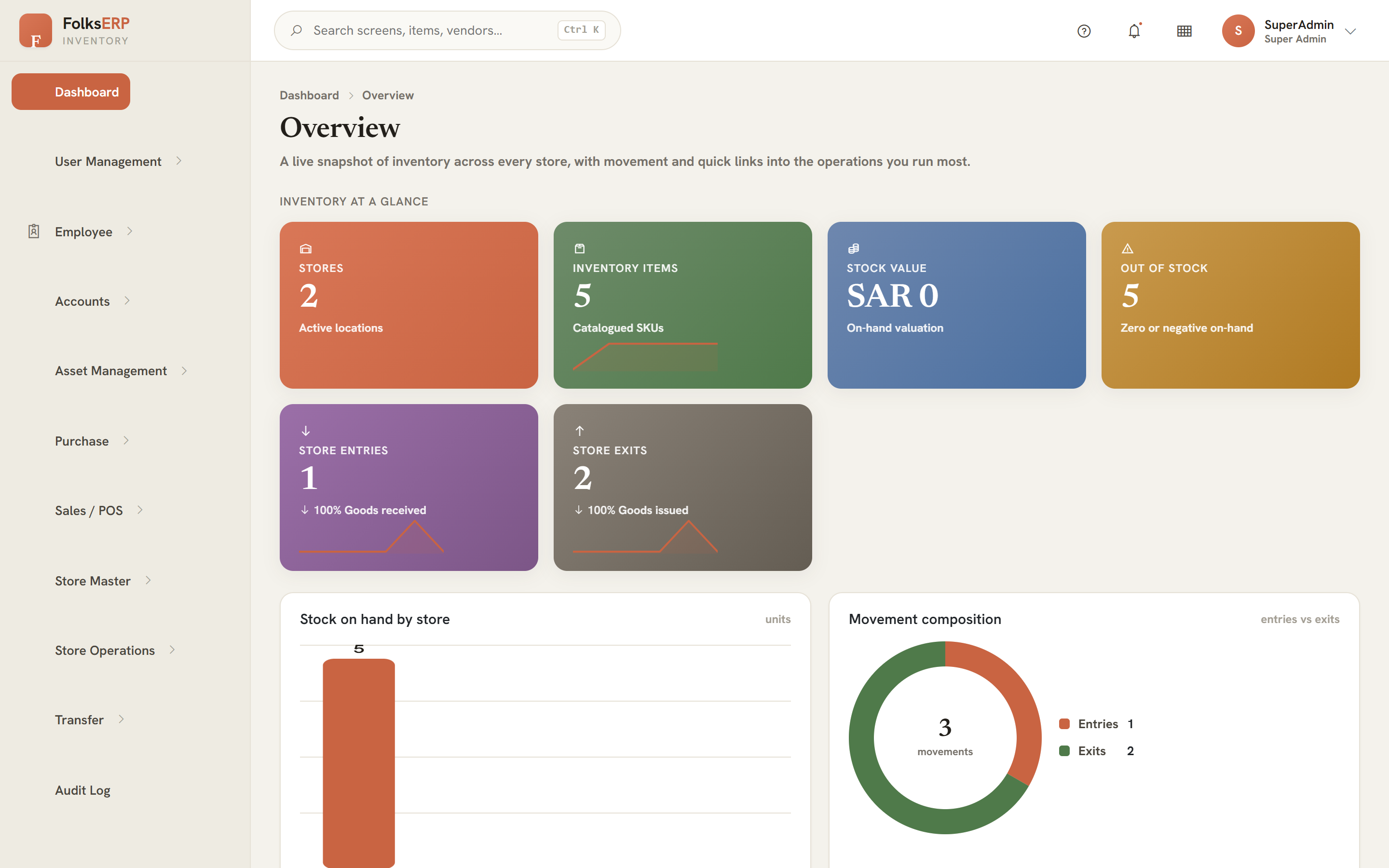
Reading the KPI cards
| Card | Means | Click goes to |
|---|---|---|
| Stores | Active store count | Store Master |
| Items | Distinct items tracked | Item Master |
| Low stock | Items under their reorder level | Store Reports → Reorder |
| Open POs | Procurement not yet delivered | Purchase Monitor |
| POS today | Value sold since the last day-close | POS Report |
| Stock value | On-hand quantity × unit cost, all stores | Stock Balance |
/homeDR · single-page module (renders as a solo sidebar link)StoreMaster, StockAtStore, PurchasePlan, PosSaleWarehouse
The heart of the system: the stores and items you stock, and every movement that keeps the balance honest.
Store Master
A store is any place stock physically lives — a warehouse, a shop floor, a kitchen, a virtual holding bin. Everything downstream (entries, sales, transfers, balances) is scoped to a store, so this is the first master you set up.
Creating a store
| Code | Name | Type | Location | Status |
|---|---|---|---|---|
| STR0001 | HQ Main Store | Warehouse | Riyadh — HQ | Active |
| STR0002 | Branch 2 Café | Retail | Jeddah | Active |
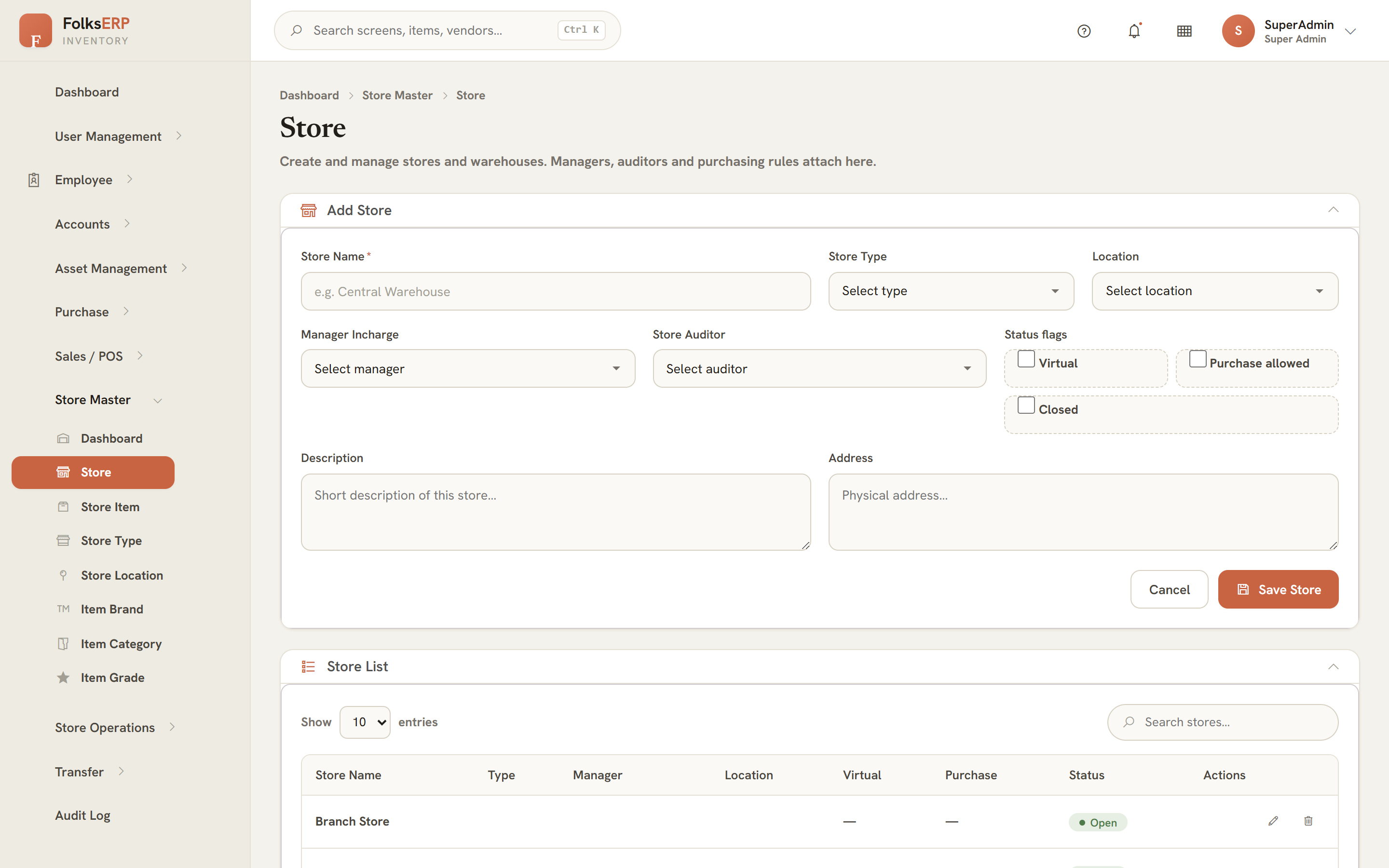
| Field | Notes |
|---|---|
| Store Name * | Required, unique-by-intent. Shown everywhere a store is picked. |
| Store Type | From the Store Type lookup (Warehouse, Retail, Kitchen, Virtual…). |
| Location | From the Location Details lookup — a physical address/site. |
| Manager / Auditor | Employees responsible; the auditor signs off stock audits and dead-stock approvals. |
| Is Virtual / Purchase Allowed / Is Closed | Flags controlling whether stock is physical, can receive purchases, or is frozen. |
The Store Master lookups
/store · /storetype · /storelocation · /storedashboardStoreMaster, StoreType, LocationDetailsItem Master
An item is a thing you stock and move — a product, ingredient or consumable. Items are described once and then stocked into many stores. Classification (brand, category, grade) and a unit of measure make reporting and reordering meaningful.
| Field | Purpose |
|---|---|
| Item Name * | The label used on every movement and receipt. |
| Category / Brand / Grade | Classification lookups for filtering and reporting. |
| Unit | Each, Kg, Litre, Box… the unit every quantity is counted in. |
| Reorder level | The threshold that drives the dashboard's low-stock alerts. |
| Unit cost / price | Cost values stock; price drives POS line totals. |
/storeitem · /itembrand · /itemcategory · /itemgradeStoreItem, ItemBrand, ItemCategory, ItemGradeStore Operations — the movement model
Store Operations is where quantity actually changes. Every operation posts a movement against StockAtStore; the balance you see is never typed, it is the sum of movements. This is the single most important idea in the warehouse.
| Operation | Effect on stock | Page |
|---|---|---|
| Store Entry | + adds | /storeentry |
| Store Exit | − removes | /storeexit |
| POS Sale | − removes | /possale |
| Transfer | − here, + there | /transfer |
| Returns | ± reverses | /storereturns |
| Damage / Dead stock | − writes off | /damageentry · /deadstock |
| Stock Audit | reconciles | /stockaudit |
| Closing Balance | snapshots | /closingbalance |
Stock In · Store Entry
A Store Entry adds quantity to a store. It is what a delivery becomes when goods arrive, but you can also raise one directly for an opening balance or an internal find. Pick the store, the item, the quantity and unit, optionally a reference (PO, delivery note), and post.
- Choose the receiving store and the item.
- Enter quantity, unit and (optionally) the unit cost and a reference.
- Post — a positive movement is written and the balance increases immediately.
- The item's on-hand at that store goes up by the entered quantity on Stock Balance.
StoreEntry → posts to StockAtStoreDevSP_…_StoreEntry_InsertStock Out · Store Exit
A Store Exit removes quantity for a reason other than a POS sale — issuing to a kitchen, consuming internally, writing off. It is the mirror of an entry: pick store, item, quantity, reason, post a negative movement.
StoreExit → posts to StockAtStoreReturns & Damage
Two pages handle the exceptions. Store Returns brings stock back (a customer return, a reversed issue) — a corrective movement. Damage Entry writes stock off as no longer sellable, recording the reason; damaged quantity leaves the sellable balance but stays visible for loss reporting.
| Page | Use when… | Stock effect |
|---|---|---|
Store Returns /storereturns | Goods come back into stock | + / reversal |
Damage Entry /damageentry | Goods are spoiled/broken | − write-off |
Stock Balance & the movement ledger
Stock Balance is the truth screen — the live on-hand quantity per item per store, computed from every movement. It is read-only by design: you change the balance by posting an operation, never by editing the number.
| Item | Store | In | Out | On hand | State |
|---|---|---|---|---|---|
| Bread Loaf | HQ Main | 60 | 36 | 24 | OK |
| Coffee Beans 1kg | HQ Main | 20 | 14 | 6 | Low |
| Paper Cups | Branch 2 | 50 | 50 | 0 | Out |
| Cappuccino Mix | Branch 2 | 30 | 12 | 18 | OK |
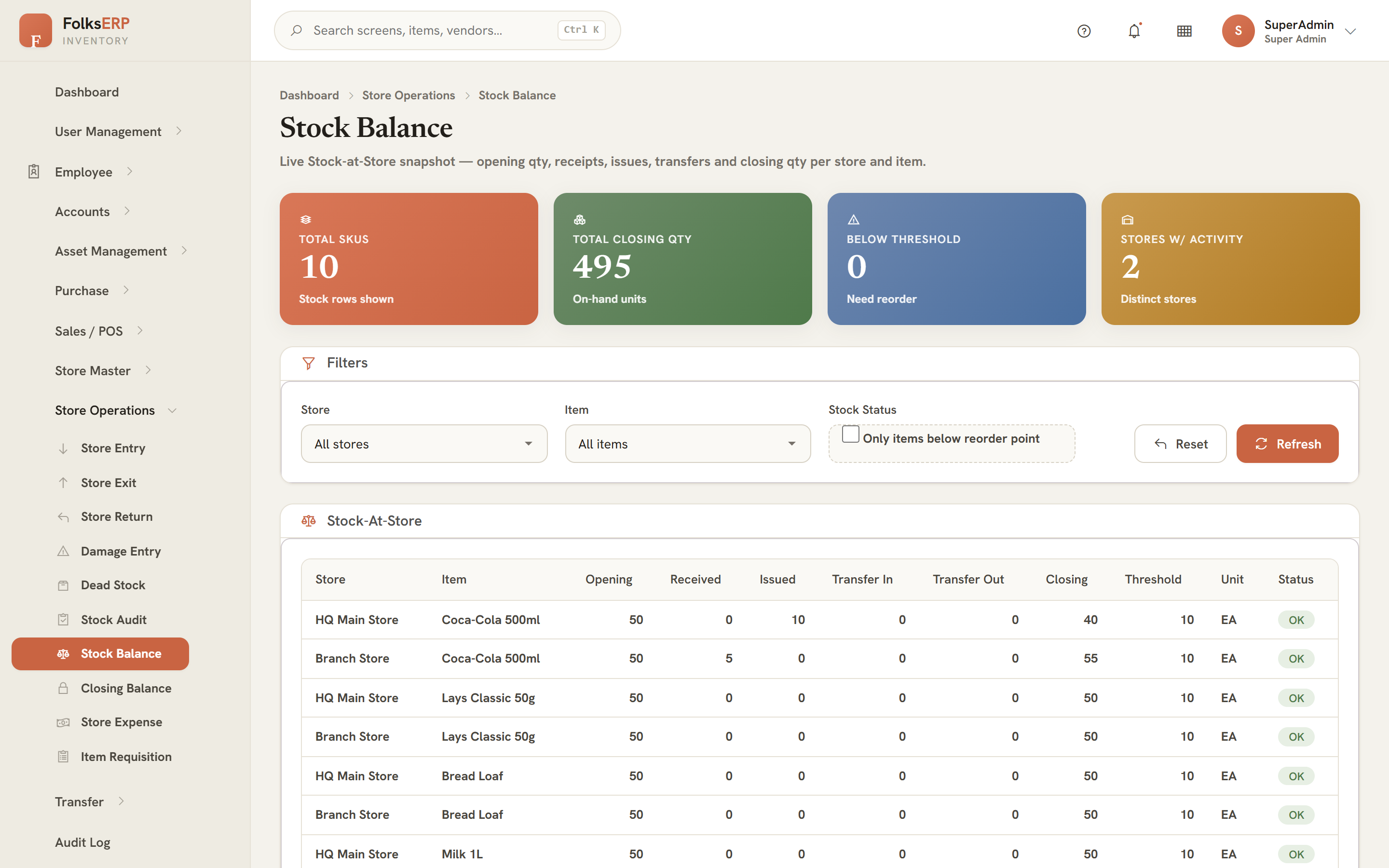
StockAtStore (aggregated from all movement tables)Stock Audit & variance
A stock audit reconciles the system balance against a physical count. You generate an audit batch (which stamps an STRAUD… code), enter the counted quantity for each item, and the system computes the variance. A shortfall is treated as a loss.
- Generate an audit batch for a store — it snapshots the current system quantities.
- Enter the physical count for each item.
- Variance = physical − system is shown per line.
- A negative variance auto-creates a Damage row linked to the audit id, so the loss is both recorded and written off in one step.
Dead Stock, Store Expense & Closing Balance
| Page | What it does |
|---|---|
Dead Stock /deadstock | Flags non-moving stock for write-down, approved by the store's auditor. |
Store Expense /storeexpense | Records costs attributable to a store (utilities, handling) for accounts. |
Closing Balance /closingbalance | One Run Period Close writes a header per store and snapshots every StockAtStore row into the closing-balance detail — your period-end stock picture, frozen. |
StoreClossingBalanceDetails so you have a defensible period-end figure. A single DevSP_…_RunPeriodClose does it in one transaction.Requisition, Reports & Item-to-Asset
Three connective pages close out Store Operations:
| Page | Role in the flow |
|---|---|
Store Item Requisition /storeitemreq | The starting gun for procurement — a store asks for an item and quantity it needs (Chapter 18 picks it up). |
Store Reports /storereports | A hub of report tiles — movement log, reorder suggestions, stock valuation. |
Store Item → Asset /storeitemtoasset | Promotes a stocked item into the long-life asset register (Chapter 28) when it becomes equipment. |
Inter-Store Transfer
A transfer moves stock from one store (the consigner) to another (the consignee) in a single governed action. It is a dual-write: an exit at the source and an entry at the destination, both stamped with the same transfer code so the two legs always reconcile.
| Page | Purpose |
|---|---|
Transfer /transfer | Raise and post a transfer; both legs are written atomically. |
Consigner /consigner | Lookup of sending parties. |
Consignee /consignee | Lookup of receiving parties. |
Transfer Report /transferreport | History of transfers with both movement legs. |
TRF-…Procurement — Requisition to Receipt
The pipeline that turns a store's need into stock on the shelf, with a governed stop and a recorded document at every hop.
The procurement pipeline
Procurement in Folks Inventory ERP is not one form — it is a tracked pipeline. A plan is created from a requisition and then walks six stages, each on its own page, each stamping a live status. A buyer can always see exactly where any item sits.
Requisition
Store raises a need.
/storeitemreqPlan
Buyer plans the qty.
/purchaseplanIndent + Tender
Float to vendors.
/createtenderreqCompare
Rank quotes.
/comparequotAward PO
Lowest wins.
/processpoDeliver
Receive to stock.
/deliveryStatus walks New Request → Indent Generated → Tender Created → Delivery Processing → Delivered. The document chain — requisition, plan, indent, tender request, quotes, purchase order, delivery note — is written as you go, and the final receipt posts a Store Entry that updates the balance.
| Stage | Page · button | Writes | Status after |
|---|---|---|---|
| 1 · Requisition | /storeitemreq | StoreItemRequest | Requested |
| 2 · Plan | /purchaseplan · Save | PurchasePlan | New Request |
| 3 · Indent | /purchaseplan · Generate Indents | PORD, PurchaseIntend | Indent Generated |
| 4 · Tender | /createtenderreq · Create Tender | PurchaseOrderRequest | Tender Created |
| 5 · Quotes | /comparequot · Capture | QuoteForPORequestDetails | Tender Created |
| 6 · Award | /processpo · Award | PurchaseOrder | Delivery Processing |
| 7 · Deliver | /delivery · Receive | Delivery, StoreDeliveryNote | Delivered |
Vendors
Vendors are the suppliers a tender is floated to and a PO is awarded to. Capture the trading name, contact and email — only vendors with an email are eligible to quote, so the compare step has someone to ask.
VendorsPurchase Plan
The plan is the spine of procurement. Start it from a Store Item Requisition — picking the requisition auto-fills the item, requested quantity and unit, and links the plan back to the request. Set the planned quantity and save; the plan enters the pipeline as New Request. From the plan list, Generate Indents advances it.
| Plan | Item | Qty | Store | Status |
|---|---|---|---|---|
| #2 | Bread Loaf | 30 | HQ Main | New request |
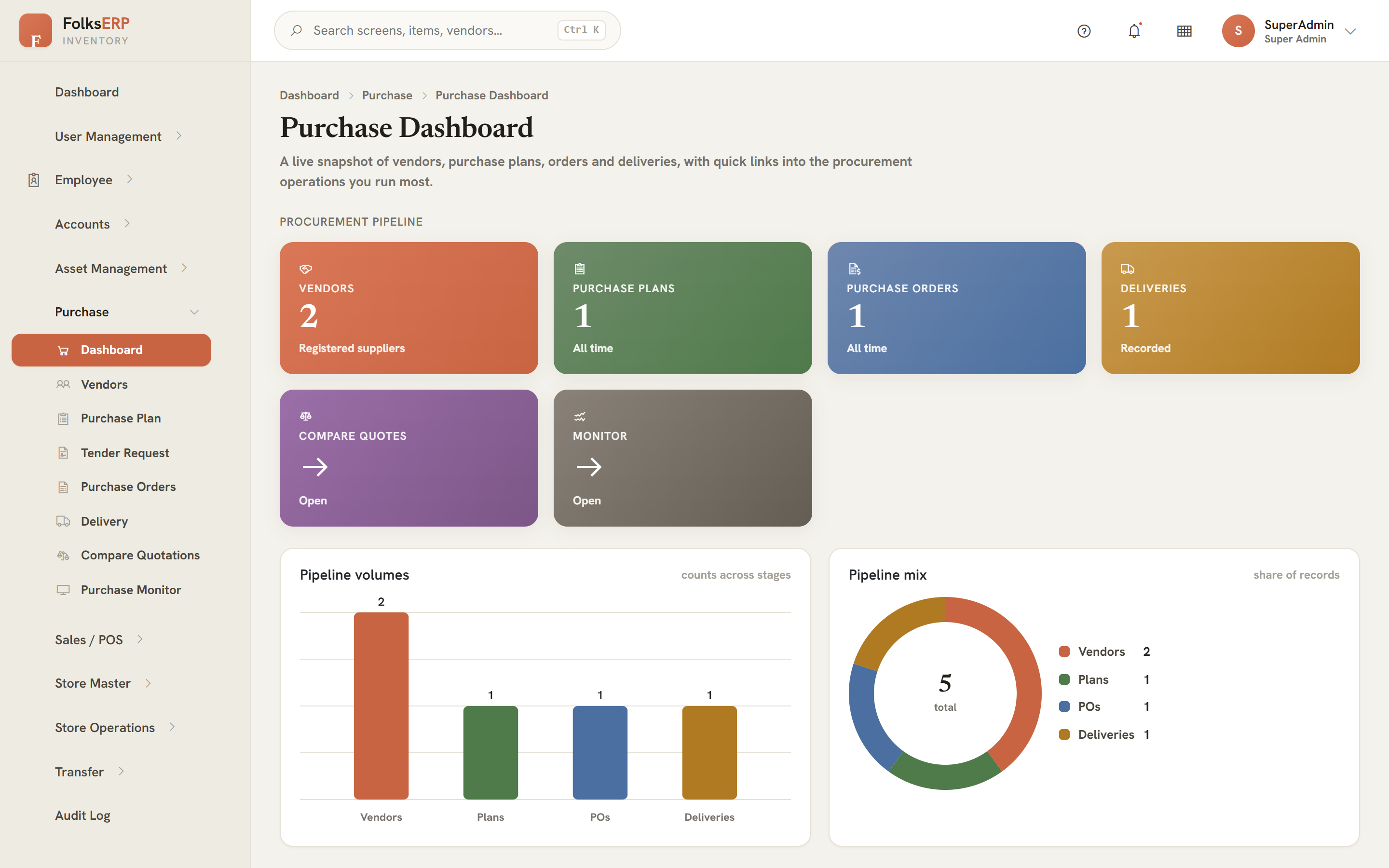
Tender & Compare Quotes
After indents are generated, Create Tender Request (/createtenderreq) bundles the indented lines and floats them to active vendors — the plan moves to Tender Created. Compare Quotes (/comparequot) then captures one quote per eligible vendor and ranks them, so the cheapest compliant offer is obvious.
| Vendor | Unit price | Total | Rank |
|---|---|---|---|
| Gulf Foods Co. | 6.20 | 186.00 | Lowest |
| Al-Noor Supplies | 6.75 | 202.50 | 2nd |
| Desert Trading | 7.10 | 213.00 | 3rd |
Award PO & Delivery
Process PO (/processpo) awards the order to the lowest quoted vendor, creating a PurchaseOrder and moving the plan to Delivery Processing. Delivery (/delivery) then processes logistics, raises the delivery note and receives the goods — which posts a Store Entry and lands the plan on Delivered.
StoreDeliveryNote and posts the received quantity as a Store Entry, so the stock balance reflects the purchase the moment it arrives.Purchase Monitor & Dashboard
Purchase Monitor (/purchasemonitor) is the control tower — every plan with its current stage, so nothing stalls unseen. The Purchase Dashboard (/purchasedashboard) rolls procurement into KPIs: open plans, spend, vendor mix, delivery cycle time.
PurchasePlan, PORD, PurchaseIntend, PurchaseOrderRequest, PurchaseOrder, DeliverySales / Point of Sale
Selling out of live stock — sessions, terminals, the till and the day-close.
POS overview
The point-of-sale module sells items straight out of a store's stock. A sale is rung inside an open session on a terminal, paid with a payment method, and recorded as a PosSale — which decrements stock and posts the takings. At end of shift, a day-close reconciles the drawer.
Terminals, methods & sessions
| Page | Sets up… |
|---|---|
POS Terminal /posterminal | A physical till bound to a store, with a default cashier. |
Payment Method /pospaymentmethod | Cash, card, wallet… the tenders a sale can be settled with. |
POS Session /possession | A cashier's shift on a terminal — opens with a float, closes at day-close. |
Ringing a sale
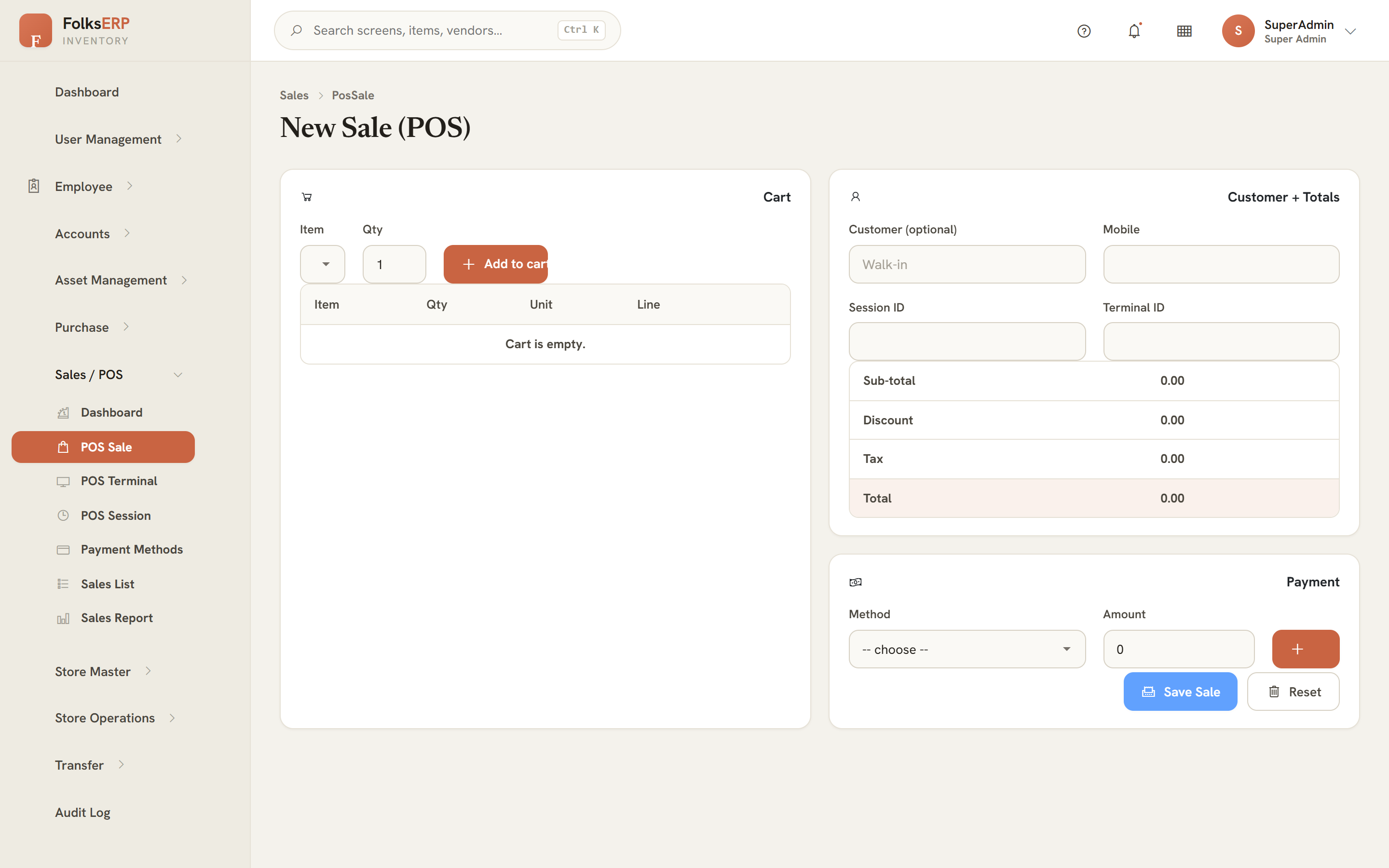
The sale screen is a fast till: search or scan items into the cart, adjust quantities, take payment. VAT is computed on the subtotal, and confirming the sale decrements each item from the session's store and writes the PosSale with its lines.
Day close & reports
| Page | Purpose |
|---|---|
Sale List /possalelist | Every sale in the period, drill into lines. |
Day Close /posdayclose | Reconciles expected vs counted cash, closes the session. |
POS Report / Sales Report /posreport · /possalesreport | Takings by item, method, terminal and cashier. |
PosSale, PosSaleDetails, PosSession, PosTerminal, PosPaymentMethodAsset Management
The long-life register — the things you own and maintain rather than sell.
Asset Management overview
Assets are durable items — ovens, vehicles, laptops, fixtures — tracked for their value, location and condition rather than their sellable quantity. The module is sixteen pages: registers, classification lookups, the place hierarchy, and the lifecycle pages (maintenance, audit, disposal). It opens on an Asset Dashboard of KPIs and quick actions.
Asset registers
The core register is Asset Item (/assetitem) — each asset carries an auto code (AST0004), a name, a category, a value per item, an item count and a purchase date. Asset Category and Asset Type classify them for reporting.
| Code | Asset | Category | Value | Count |
|---|---|---|---|---|
| AST0001 | Dell Latitude | Laptops | 95,000.00 | 10 |
| AST0002 | Espresso Machine | Kitchen | 42,000.00 | 2 |
| AST0003 | Delivery Van | Vehicles | 180,000.00 | 1 |
Devices, equipment & utilities
| Register | Tracks | Key lookups |
|---|---|---|
Device Master /devicemaster | IT & electronic devices | Device Type, Ownership, Contact |
Equipment Master /equipmentmaster | Machinery & plant | Equipment Type, Ownership |
Utility Master /utilitymaster | Utilities & services | Utility Type, Ownership, Contact |
Each register shows names, not raw ids — type, ownership and contact are chosen from dropdowns and displayed as labels, with a derived code (DEV0001, EQP0001).
Projects, sites & locations
Assets live somewhere. Projects (/projects), Project Sites (/projectsites) and Location Details (/locationdetails) form the place hierarchy that an asset, a store or a device can be assigned to.
Maintenance, auditing & disposal
| Page | Lifecycle stage |
|---|---|
Asset Maintenance /assetmaintanance | Schedule and close maintenance jobs against an asset unit. |
Asset Auditing /assetauditing | Verify an asset's presence and condition at a site, with an audit status. |
Asset Dispose /assetdispose | Retire an asset at end of life, recording the disposal type. |
AssetItem, AssetCategory, AssetType, DeviceMaster, EquipmentMaster, Projects, ProjectSites, LocationDetailsAccounts
The money ledger behind every physical move — a real double-entry book.
Accounts overview
The Accounts module is a proper double-entry ledger: a chart of accounts grouped into ledger groups, balanced journal vouchers, a cash book, cheques and bank charges, and a balance sheet. Stock and trade events have a money side, and this is where it is recorded.
Chart of accounts
The Account Master (/accountmaster) is the chart of accounts — each account has a derived code (ACC0001), a name, a ledger group, a type (Asset, Liability, Income, Expense, Equity) and an opening balance. Ledger Group and Sub Ledger organise it.
| Code | Account | Group | Type | Opening |
|---|---|---|---|---|
| ACC0001 | Cash | Current Assets | Asset | 50,000.00 |
| ACC0002 | HDFC Bank | Bank | Asset | 220,000.00 |
| ACC0003 | Rent Expense | Overheads | Expense | 0.00 |
Transaction entry — double-entry
A transaction is a balanced voucher: total debits must equal total credits before it will save. The entry screen lets you add as many lines as needed, picking an account per line and a debit or credit amount, with a narration.
Cash book & statements
| Report | Shows |
|---|---|
Ledger /ledger | Posted transactions for a date range, with print & CSV export. |
Cash Book /cashbook | Cash receipts and payments with a running balance. |
Cheque Details /chequedetails | Cheques with bank, account, amount and status (Pending / Cleared / Bounced). |
Bank Charge Details /bankchargedetails | Bank fees captured to the right expense account. |
Balance Sheet /balancesheet | Assets vs. liabilities & equity, grouped. |
Accounts_Ledger, Accounts_LedgerGroup, Transaction, Accounts_Cheque_DetailsAdministration
People, access and accountability.
User Management & RBAC
User Management is the security base of the whole suite — users, roles, the menu tree, and the privileges that map roles to pages. Everything else in this manual is visible only because UM grants it.
| Page | Manages |
|---|---|
User Management /usermanagement | Users and their designation-based access. |
Role Management /rolemanagement | The roles a user can hold. |
Menu Management /menumanagement | The main-menu / sub-menu tree the sidebar is built from. |
Employee Privilege /employeePriviliege | Grants pages to a role — the lever that shows/hides screens. |
Workflow /workflow | Internal & external approval routing. |
Employee register
The employee register is the people directory the rest of the app draws on — store managers, auditors, cashiers, buyers are all employees here.
| Page | Purpose |
|---|---|
Employee List /emplist | The master table — code, name, designation, phone, email, status. |
Employee Registration /empregistration | Onboard a new employee. |
Employee Profile /empprofile | The full record for one person. |
Department / Designation /department · /designation | Organisational lookups. |
Audit Log
The audit log is the trail of who did what and when across the platform — a read-only report you filter by user, action and date. It is the page you open when you need to answer "who changed this?"
/auditlog · solo sidebar linkReference
The quick-lookup back of the book — statuses, the data model, troubleshooting and a glossary.
Status & badge reference
Procurement pipeline status
Stock state
Cheque status
The SQL-first data model
For implementers: every screen maps to tables and procedures by a consistent naming convention.
| Artefact | Convention | Example |
|---|---|---|
| Generic CRUD proc | SP_…_<Table>_<Verb> | SP_…_StoreMaster_Insert |
| Workflow proc | DevSP_…_<Process> | DevSP_…_RunPeriodClose |
| List endpoint | /api/<Resource> or /GetRecords | /api/StoreInventoryItem |
| Auto code | Prefix + zero-padded id | AST0004 |
MainMenu + SubMenu rows, surfaced by DevSP_…_UM_GetMenuDetailsByUserId, with the route derived as "/" + SubMenuName (lower-cased, spaces removed).Troubleshooting & glossary
| Symptom | Most likely cause | Fix |
|---|---|---|
| A page is missing from the sidebar | Your role lacks the privilege | Grant it in Employee Privilege (Ch 37) |
| A dropdown is empty | The lookup has no rows yet | Add records in the relevant master |
| An exit/sale is refused | Would drive stock negative | Run a Stock Audit to reconcile (Ch 14) |
| A voucher won't save | Debits ≠ credits | Balance the lines (Ch 35) |
| A plan is stuck | A pipeline action wasn't run | Open Purchase Monitor and advance it (Ch 23) |
Glossary
- Movement
- A single signed change to stock — every entry, exit, sale, transfer leg, return or damage.
- StockAtStore
- The live on-hand quantity per item per store, computed from movements.
- Requisition
- A store's request for an item and quantity — the start of procurement.
- Plan
- The procurement record that walks the six pipeline stages.
- Indent
- The internal authorisation to buy, generated from a plan.
- Tender
- A request for quotes floated to eligible vendors.
- Consigner / Consignee
- The sending / receiving store in a transfer.
- Session
- A cashier's POS shift on a terminal, opened with a float and reconciled at day-close.
- Period close
- A snapshot of every stock balance into the closing-balance detail.
- RBAC
- Role-based access control — pages shown per role via seeded privileges.
- DevSP
- A workflow stored procedure that performs a multi-step action in one transaction.